


Blog
Linear Versus Benching Workstations Compared

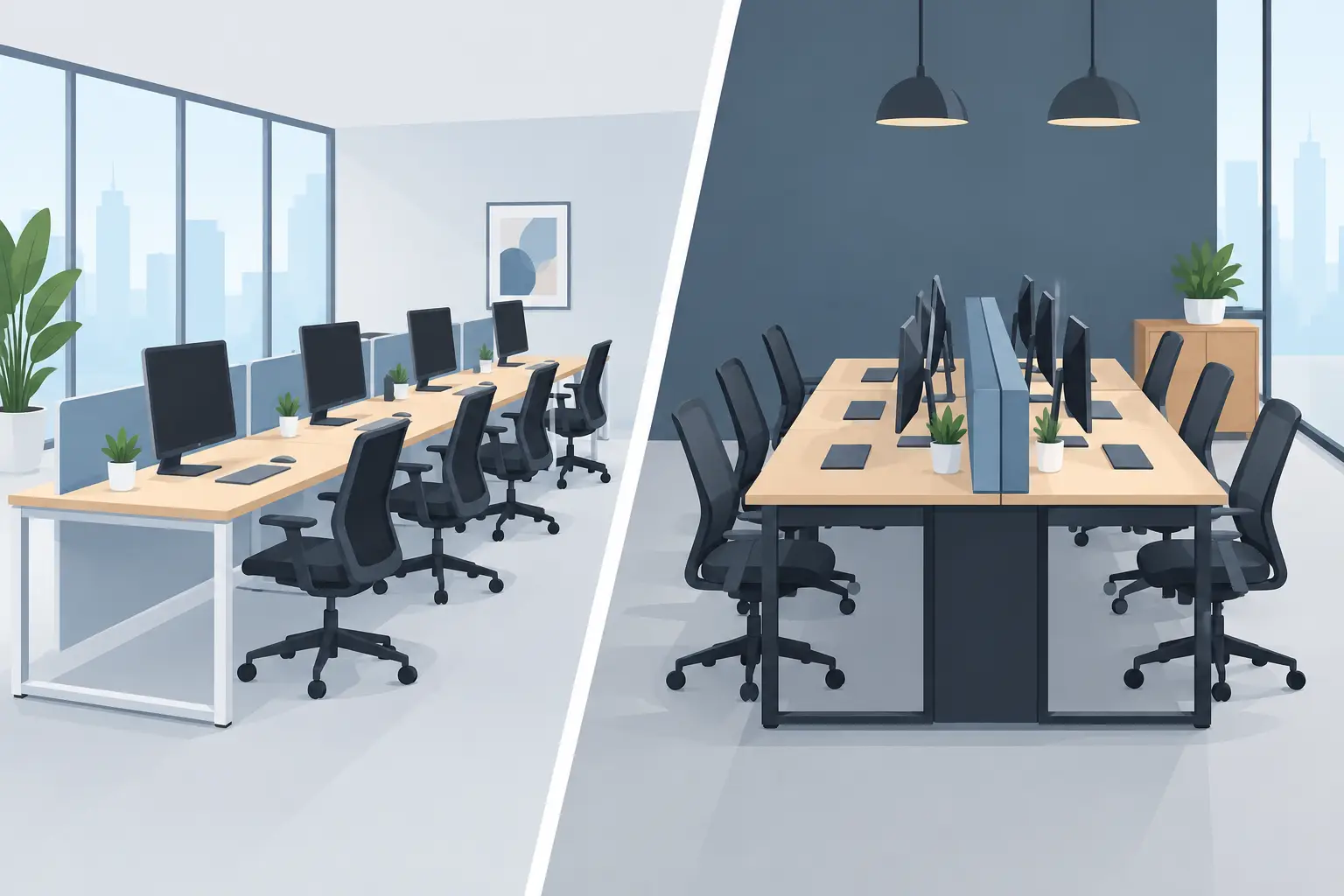
A workstation layout does more than determine where people sit. It affects concentration, supervision, storage access, circulation, and the impression your office makes on clients and employees. When comparing linear versus benching workstations, the right answer is rarely about one style being universally better. It is about choosing the format that supports how your team works now, while leaving room for a credible, organized future.
For growing businesses, professional firms, and established corporate offices, the choice often comes down to two priorities: individual focus or efficient team density. Both linear and benching workstations can deliver a refined, high-performance environment when specified with the right dimensions, privacy panels, cable management, storage pedestals, and seating.
What Are Linear Workstations?
Linear workstations arrange desks in a single row, typically along a wall, window line, or open office perimeter. Each employee has a defined work surface, with positions placed side by side rather than facing one another. The format may use freestanding desks or connected workstation runs with shared modesty panels and cable trays.
This layout is familiar for good reason. It provides a clear sense of personal territory and gives planners flexibility around room edges, columns, and circulation routes. In client-facing offices, linear runs can also create a composed visual rhythm that feels orderly rather than crowded.
Where linear layouts perform best
Linear workstations are a strong choice for teams that spend much of the day on detailed, confidential, or screen-intensive work. Finance, legal, administration, design, and management support teams often benefit from a layout that limits direct face-to-face distraction.
They are also useful in narrow rooms. Rather than placing a large central bank of desks in the middle of the floor, a linear configuration can preserve a generous walkway and maintain clear access to filing cabinets, meeting rooms, and reception areas. With a suitable privacy panel, each seat gains a more focused setting without making the office feel closed off.
For organizations assigning desks by role or seniority, linear workstations make personalization easier. Employees can add a mobile pedestal, a fixed drawer unit, a task light, or monitor arms without disrupting the whole cluster. This can be particularly valuable where paper files, specialist equipment, or larger dual-screen setups are part of daily operations.
The trade-off with linear workstations
Linear planning uses floor area less densely than benching. Each desk generally needs more perimeter length, and placing desks along walls can limit opportunities for shared power access and collaborative interaction. A long row may also feel segmented if teams need to exchange information throughout the day.
The design matters here. Repeated finishes, aligned cable management, and coordinated ergonomic mesh chairs can turn a simple row of desks into a polished workstation zone. Without those details, linear furniture can look like a collection of individual desks rather than a considered commercial office system.
What Are Benching Workstations?
Benching workstations place multiple desks in shared rows, usually with employees facing each other across a central frame or cable channel. A two-person bench may suit a compact office, while four-person, six-person workstation clusters, or larger configurations create a highly efficient team area. Shared legs, central power management, and consistent desk dimensions give benching a clean, modern appearance.
The principal advantage is density. Benching allows a business to accommodate more people in the same footprint while preserving a unified, contemporary aesthetic. It is particularly effective in open-plan offices where departments need to sit together and managers want clear sightlines across the workspace.
Where benching supports team performance
Benching suits teams that collaborate frequently and rely on quick conversations. Sales groups, customer service teams, creative departments, project teams, and fast-growing startups often appreciate being able to consult a colleague without crossing the office or booking a meeting room for every small decision.
It also supports a disciplined visual standard. A coordinated bench system keeps desktops aligned, cables contained, and power access centralized. When paired with mobile storage pedestals and breathable mesh task chairs, it creates a workspace that feels purposeful, efficient, and ready for scale.
For procurement teams, benching can simplify specification. Instead of sourcing separate desks and bases for every employee, a workstation cluster can be planned by seat count. This makes it easier to budget for a 4-person team today and add another matching cluster when headcount increases.
The trade-off with benching workstations
Higher density can create more noise, visual movement, and interruptions. Employees facing one another may feel exposed if desktop privacy is not considered. A benching layout can also become untidy quickly if there is no dedicated provision for personal storage, bags, paperwork, and device cables.
These issues are not reasons to avoid benching. They are reasons to specify it properly. Mid-height privacy panels can reduce visual distraction while retaining the openness of the plan. Integrated cable trays prevent power cords from becoming an operational and visual problem. Mobile pedestals give each user a secure place for essentials, while nearby vertical filing cabinets can handle shared records without crowding individual desks.
Linear Versus Benching Workstations: Key Planning Factors
The most effective decision starts with the work itself, not the furniture catalog. Consider how often employees need to speak, how much confidential material they handle, and how long they remain at their desks each day. A team processing sensitive documents has different needs from a sales team managing live calls and shared targets.
Privacy and concentration
Linear workstations usually provide more natural psychological separation. Users face the same direction, often toward a wall or open view, which helps reduce direct visual interruption. This can be ideal where concentration and professional discretion matter.
Benching can still offer a focused environment, but it requires more intentional privacy measures. Desk screens, acoustic materials, and assigned storage should be part of the initial layout rather than later additions. For offices with a mix of quiet work and collaboration, a hybrid plan is often the strongest option: benching for active teams and linear desks for roles needing greater focus.
Space efficiency and circulation
Benching usually wins when seat capacity is the primary objective. Its shared structure allows more people to work within a central zone, leaving perimeter walls available for storage, meeting tables, or informal seating. This approach can make a compact office feel better organized, provided aisles remain comfortable and emergency access is clear.
Linear workstations are often easier to fit around irregular architecture. If an office has narrow bays, window walls, columns, or multiple access doors, a row-based layout may avoid awkward dead space. The best plan should never force people to squeeze past chairs or storage units simply to gain one additional desk position.
Storage and cable management
Both formats need a storage strategy. In a linear layout, under-desk drawers and mobile filing pedestals can be assigned to each workstation with minimal disruption. In a benching configuration, shared central cable channels are a major advantage, but personal storage must be planned carefully so the desk surface remains clear.
A polished office is not defined only by premium finishes. It is defined by what employees do not have to see: loose wires, overflowing documents, improvised charging stations, and bags placed in circulation paths. Storage cabinets, pedestals, and integrated power solutions protect both daily efficiency and professional presentation.
Growth and reconfiguration
A startup may favor benching because it creates an efficient launchpad for a growing team. An executive office or professional services firm may prefer linear workstations because designated positions reflect role clarity and a more private working culture. Neither decision needs to be permanent.
Modular workstation systems allow organizations to add seats, revise department zones, or shift a team from a linear run into a shared cluster as operating requirements change. Selecting durable commercial-grade finishes and compatible components protects the investment when the office evolves.
Choosing the Right Layout for Your Office
Choose linear workstations when focused work, personal space, room constraints, or a more traditional professional arrangement lead the brief. Choose benching when collaboration, seat density, centralized cable management, and scalable team planning are the priorities.
For many offices, the strongest result combines both. A benching cluster can support operational teams, while linear desks serve accounts, management, or specialist roles. Add ergonomic chairs with adjustable support, practical storage, and meeting spaces that match the authority of the main workspace. The result is an office that does not merely fit people in, but gives them the structure to perform with confidence.
Before approving a layout, map actual work habits for a typical week. The right workstation plan is the one that gives employees enough room to focus, enough access to collaborate, and a workplace they are proud to represent.
Request a Quote for your office furniture requirement.


